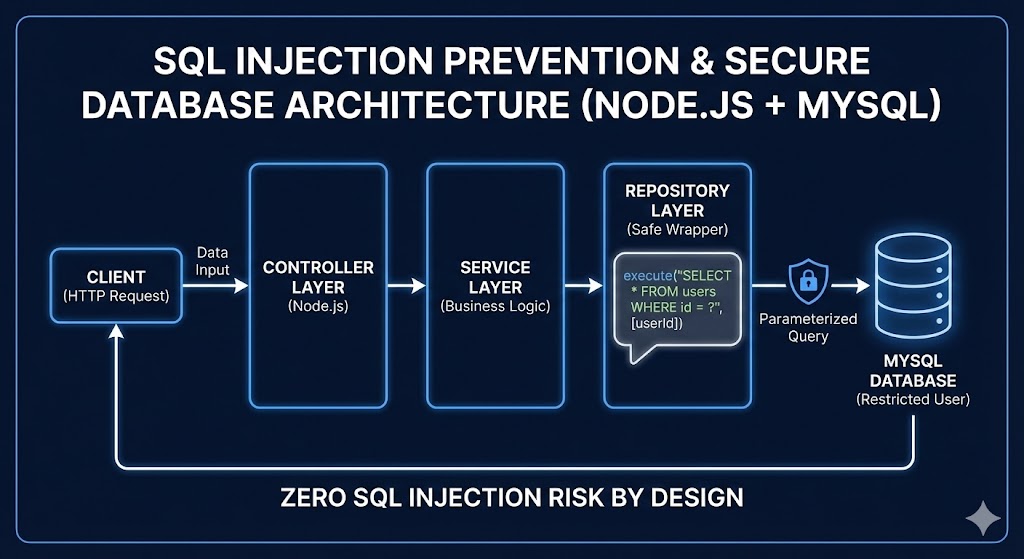
1. Purpose
This document defines the official engineering standard for preventing SQL injection vulnerabilities and ensuring secure database access. This guideline applies to all backend services interacting with MySQL. Our goal is to achieve zero SQL injection risk by architectural design. Not by filtering or detection, but by elimination. It’s a wrong mindset!
2. What is SQL Injection?
SQL injection is a web security vulnerability that allows attackers to interfere with queries an application makes to its database. By inserting malicious SQL code into input fields, attackers can view, modify, or delete data, and in some cases, gain administrative control over the application. SQL Injection occurs when untrusted user input is interpreted as SQL code instead of data.
Example of vulnerable code:
const query = `SELECT * FROM products WHERE category = '${category}'`;
If attacker provides:
OR 1=1 --
Query becomes:
SELECT * FROM products WHERE category = '' OR 1=1 --'
This allows unauthorized data access. Root cause: Mixing user input with SQL structure.
3. Incorrect Approach: Keyword Filtering (Blacklist Validation)
Example of incorrect implementation:
Let’s say we have API GET list products with filter by category:
const query = `SELECT * FROM products WHERE category = '${category}'`;
req: GET /api/products
query:
{
  "category": "SELECT * FROM products"
}
res:
{
  "status": "error",
  "message": "Potential SQL Injection detected: SELECT"
}
Why this is wrong:
- False Positives: It blocks legitimate input. For example, if a product category is named “SELECT”, it will be blocked.
- False Negatives: It doesn’t block all SQL injection attacks. Attackers can use various techniques to bypass the filter.
- Performance: It adds unnecessary overhead to the application.
- Maintenance: It requires constant updates to keep up with new SQL injection techniques.
- Security: It gives a false sense of security. Attackers can bypass the filter and exploit the vulnerability.
Why Keyword Filtering is Wrong
3.1 False Positives
It’s will break the user input for legitimate input. For example if a product category name is:
- SELECT Street
- Selecta Hills
- SELECT Edition Keyboards
3.2 False Negatives
It doesn’t block all SQL injection attacks. Attackers can use various techniques to bypass the filter.
Even if SELECT is blocked, attackers can still use:
OR 1=1
OR SLEEP(5)
SQL injection occurs due to unsafe query construction, not due to keywords. Properly parameterized queries are safe regardless of input. This is safe:
execute(
  "SELECT * FROM products WHERE category = ?",
  ["SELECT * FROM products"]
);
3.3 Performance
It adds unnecessary overhead to the application. Our business logict needs to add extra logict for denylist validation. Or some cases, we need to add extra logict for whitelist validation. It’s not a good practice.
3.4 Maintenance
It requires constant updates to keep up with new SQL injection techniques.
3.5 Security
It gives a false sense of security. Attackers can bypass the filter and exploit the vulnerability. Attackers can bypass keyword filtering using: SeLeCt
SEL/**/ECT

%53%45%4C%45%43%54

CHAR(83,69,76,69,67,84)
4. Correct Approach: Eliminate Injection via Architecture
SQL injection must be prevented at the database access layer. Not at the HTTP layer. Security must be enforced by design.
4.1 Use Prepared Statements
Prepared statements are the most effective way to prevent SQL injection. They separate SQL code from user input, ensuring that user input is always treated as data, never as code.
Example of correct implementation:
const query = "SELECT * FROM users WHERE email = ?";
const params = [email];

connection.execute(query, params, (err, results) => {
  if (err) {
    console.error("Error executing query:", err);
    return;
  }
  console.log("Query results:", results);
});
5.Example of Secure Database Architecture Standard
Approved architecture:
- Controller Layer
- Service Layer
- Repository Layer (SQL exists ONLY here)
- Safe Database Wrapper (execute only) # as is already make the own wrapper with mysql2
- MySQL (restricted user)
SQL execution is restricted to repository layer only.
5.1 Controller Layer
// Controller Layer
class ProductController {
  constructor(productService) {
    this.productService = productService;
  }

  async getProducts(req, res) {
    const { category } = req.params;
    const products = await this.productService.getProducts(category);
    res.json(products);
  }
}
5.2 Service Layer
// Service Layer
class ProductService {
  constructor(productRepository) {
    this.productRepository = productRepository;
  }

  async getProducts(category) {
    return this.productRepository.getProducts(category);
  }
}
5.3 Repository Layer
// Repository Layer
class ProductRepository {
  constructor(db) {
    this.db = db;
  }

  async getProducts(category) {
    const query = "SELECT * FROM products WHERE category = ?";
    const params = [category];
    return this.db.execute(query, params);
  }
}
5.4 Safe Database Wrapper
// Safe Database Wrapper
class SafeDatabaseWrapper {
  constructor(db) {
    this.db = db;
  }

  async execute(query, params) {
    return this.db.execute(query, params);
  }

  /**
   * Transaction wrapper
   */
  async  transaction(callback) {
    const connection = await this.db.getConnection();
    try {
      await connection.beginTransaction();
      const tx = {
        execute: async (query, params = []) => {
          validateQuery(query, params);
          const [rows] = await connection.execute(query, params);
          return rows;
        }
      };

      const result = await callback(tx);
      await connection.commit();
      return result;

  } catch (error) {
    await connection.rollback();
    throw error;
  } finally {
    connection.release();
  }
}
}

async function initDB() {
    const pool = mysql.createPool({
        host: process.env.DB_HOST,
        port: process.env.DB_PORT || 3306,
        user: process.env.DB_USER,
        password: process.env.DB_PASS,
        database: process.env.DB_NAME,

        waitForConnections: true,
        connectionLimit: 10,
        queueLimit: 0
    });

    return new SafeDatabaseWrapper(pool);
}
5.5 MySQL User Privilege Restriction
-- Create restricted user
CREATE USER 'app_user'@'localhost' IDENTIFIED BY 'secure_password';

-- Grant minimal required privileges
GRANT SELECT, INSERT, UPDATE, DELETE ON app_db.* TO 'app_user'@'localhost';

-- Revoke all other privileges
REVOKE ALL PRIVILEGES ON *.* FROM 'app_user'@'localhost';

-- Disable shell access
ALTER USER 'app_user'@'localhost' WITH NOLOGIN;

-- Flush privileges
FLUSH PRIVILEGES;
6. Handling dynamic queries safely
Unsafe:
const query = `SELECT * FROM users ORDER BY ${sortField}`;
Safe:
const allowedSortFields = {
  name: "name",
  created: "created_at"
};

const sortField = allowedSortFields[userInput] || "created_at";
const query = `SELECT * FROM users ORDER BY ${sortField}`;
7. Engineering Rules (Mandatory)
All engineers must follow these rules:
- Never concatenate SQL strings.
- Always use execute(query, params).
- SQL only allowed in repository layer.
- Never import mysql2 outside core/db.js.
- Never trust user input in SQL structure.
- Always use allowlist for dynamic identifiers.
- Never use root DB user.
8. Security Review Checklist
Before merging code, verify:
- Uses execute().
- Uses parameterized queries.
- No string concatenation.
- No SQL in controller/service layers.
- Dynamic identifiers use allowlist.
- No mysql2 import outside db.js.
9. Summary
SQL injection is a critical vulnerability that can lead to data breaches, data loss, and system compromise. By following these guidelines, you can prevent SQL injection attacks and protect your application from malicious actors.
- Incorrect mindset: Detect SQL injection via keyword filtering.
- Correct mindset: Prevent SQL injection via secure architecture.
SQL injection is prevented by:
- Prepared statements.
- Repository pattern.
- Safe database wrapper.
- Permission isolation.
- Proper architecture. Not by keyword filtering.
10. Final Principle
Golden Rule:
- Never concatenate SQL. Always parameterize.
- Primary prevention: parameterized queries everywhere (? placeholders).
- Dynamic SQL safety: allowlist sorting/filtering identifiers; never trust client-provided SQL fragments.
- Input validation: validate by business rules (e.g., zip code format), not by keyword scanning.
- Reduce impact: least-privilege DB user, disable multi-statements, monitoring/logging.
- Systematize: centralized repos + DB wrapper + lint/review guardrails.
If this rule is followed and enforced architecturally, SQL injection risk becomes effectively zero.